MVR Data & Fixture Config
The MVR Data & Fixture Config section is used to load an MVR file and match each fixture it contains to a fixture in the Titan database before importing.
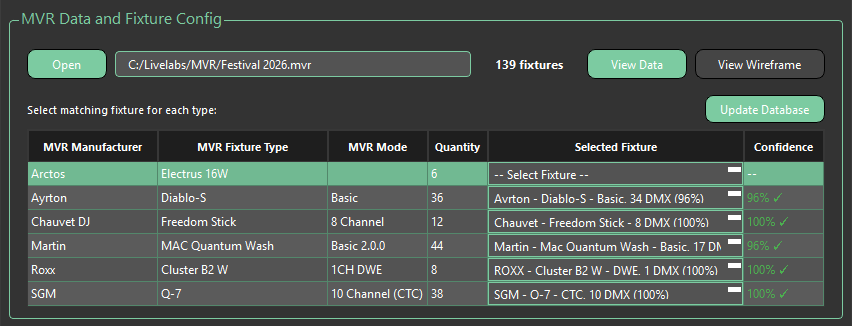
Controls
- Open MVR — Selects and opens the MVR file to be imported
- Fixture Count — Displays the total number of fixtures found in the loaded MVR file
- View Data — Opens a table view displaying the fixture data contained in the MVR file. See View Data for details.
- View Wireframe — Opens a 3D wireframe view of the fixture positions in the MVR file. See View Wireframe for details.
Database Update
MVR Fixture Importer uses a local fixture database to match against fixtures in your MVR file. When a new database version is available, an orange Database Update Available notice will appear to the left of the Update Database button. A pop-up will also appear on launch notifying you of the update.
Clicking the orange notice will take you to the download page for the latest database file. Once downloaded, click Update Database and navigate to the downloaded file to apply the update.
MVR Fixture Importer is currently the only Livelabs Creative product that has a separate database update independent of the main application.
Auto-Match
Fixtures are matched to the Titan database automatically as soon as an MVR file is loaded. Matches should still be reviewed before importing — any match, whether automatic or manually made, can be overridden at any time via the Selected Fixture dropdown.
If a fixture can't be matched automatically, click the dropdown in the Selected Fixture column and select Manual Search. This will open a search window where you can find and select the correct fixture manually.
To have a fixture type ignored during patching, leave its Selected Fixture dropdown set to -- Select Fixture --. The patch process will skip any fixture type left this way.
Match Table
| Column | Description |
|---|---|
| MVR Manufacturer | Manufacturer name as defined in the MVR file |
| MVR Fixture Type | Fixture type as defined in the MVR file |
| MVR Mode | Fixture mode as defined in the MVR file |
| Quantity | Number of fixtures of this type found in the MVR file |
| Selected Fixture | Dropdown for manual selection of a Titan fixture — contains the 10 most relevant matches. High-confidence matches are pre-selected |
| Confidence | Indicates how confident the importer is that the selected Titan fixture matches the MVR fixture |